I get a lot of emails from my students (and former students) asking me how they can learn web design quickly. Many graphic designers who have concentrated on print design; finally are recognizing the need for web coding skills. It is my personal opinion that any designer who does promotional work is at a great disadvantage not knowing web design. The basic coding skills needed are CSS and html; javascript doesn't hurt either. But a good working knowledge of Dreamweaver, CSS and html can go a long way. Here you will find some of the tips I have shared with my students and Download Web-resource-page for a painless way to learn web from various free online sources.
Is Wix.com the Answer To Not Learning Coding?
I have recently been teaching a web project in one of my classes where my students create an identity (logo and graphic standards) for a small business and create an online presence (a website and market it through social media such as: a blog, Facebook, Twitter etc.). They must search for relevant keywords using the Google Adwords Keywords tool and measure the results in Google Analytics and by using other search engine optimization (SEO) technology. It has been a very successful project and here are just a few of the many student designed sites from the class. – see links below:
Some use wix.com but my students have claimed to have found it can be a bit buggy at times. They have reported crashes and a loss of work on a design they were creating in Wix, even though they say they saved it. Also, some have reported trouble forwarding domains; although other students have reported not having any problems whatsoever. I won't recommend it yet for a business site that needs utmost stability. Although, many people (indie artists, musicians, actors, craftspeople, as well as other small business owners, do use it.
It is Flash-driven so it is limited in media delivery (doesn't work on mobile devices yet) but works for those in my class that don't know html and CSS. I think it is a viable resource for anyone who can't afford to have a site designed for them and I know that wix is continually seeking to improve their platform. The best part is you can start off for free! If it works for you, you can sign up at the level of service that you need.
Lynda.com Is My Top Recommendation For Design Professionals Needing To Learn Web Design
You could sign up for Lynda.com and watch videos from the extensive library on web design programs. Latest titles include Dreamweaver 5 Essential Training; Dreamweaver 5 with CSS integration; Dreamweaver 5 with Business Catalyst (a new downloadable app. from Adobe that lets you create shopping carts and newsletter blasts etc without knowing back end coding). You can also learn CSS 3 and html 5 quickly. You can get hooked up for as low as a 25.00 monthly subscription or opt for a longer term commitment and get more benefits such as exercise files as a resource – it's pretty affordable and you can cancel your subscription at anytime. I recommend, if you are not familiar with lynda.com that you go to the site and watch some of the free videos on an incredibly, wide range of technology and design industry-related topics. That is how I manage to keep up to date for managing my client work and for teaching my students.
Other Free Resources
I have attached a handout I put together with some web resources – I linked the ones that I use for my classes here. Also, if you own Dreamweaver, try opening a starter page and using the resources I provide here, then go into the code view and start to tinker around under the hood – it will start to make sense quickly. Hope this helps! Download Web-resource-page
Stay Tuned – I Will Be Posting More Resources On Web Design and SEO Soon!
While watching a very interesting and relevant title on lynda.com titled how to pitch ideas, I came across this quote that I couldn't pass up on posting by Charles Warren whose title is Manager of Mobile User Experience at Google.
"New ideas don't come from competitors, looking at competitors is like look in a rear view mirror because whatever they are doing now they thought of a year ago. Nor does it come from blogs or the media, [because everybody reads them] you can't out read the competition; the most reliable way of looking at the future is by looking at the people you want to serve. find your audience and serve them well." – Charles Warren – Manager of Mobile User Experience at Google
I found this article by Scott Mc Dowell and had to repost it because it makes some great points about the power of creative collaboration – no matter the medium or discipline . Here is a excerpt from the article:
“In jazz, creative input is egalitarian and meritocratic. If you can “blow” you can play regardless of background, personal style, or anything else. Miles Davis famously wrote in his autobiography, “I don’t care if a dude is purple with green breath as long as he can swing.” Do you add spice to your creative team? Do you contribute to the process of the whole?” – Scott McDowell
I am constantly reading and conducting research about being successful in business and in life and about how to generate abundance and wealth. One common message runs through all the authors I respect (I base that respect on a proven track record)– they all say you have to GIVE to GET.
If you want something then start giving –give of your time and your talents in return for experience and knowledge. Give to a charity you are passionate about and it will come back to you. Work for free when you have the opportunity to learn from someone who is very successful at what you wish to do (again look at the track record). That is not to say that there won't be people out to exploit you, but those are typically unsuccessful people who don't have much to offer, so they think that have to use others in order to survive or get ahead. Do your due diligence before you get involved with them. Find out what they have accomplished. I believe you will know in your gut when someone is out to take advantage of you. Listen to that voice in your head — if it tells you to back away — listen.
So how can you give and get? Here is one project that I have implemented in my Advanced Design class. These students are about to enter the job market and are looking to make contacts in creative agencies in our area. The project's objective is to convince creative professionals to donate their unused art supplies to local public schools. Instead of throwing them away and polluting the environment, they can donate them to public schools. It's a win for everyone involved– the schools receive desperately needed art supplies. Note: We discovered through research that a public school teacher's average budget for each student for art supplies is $1.00. Sad but true! It appears that arts come last in public education, even though creative problem solving is a fundamental skill needed in every profession and business.
How do my students benefit – aside from the obvious warm feeling one gets from doing a good deed? If their work stands out and the agency responds to the campaign, they get the opportunity to showcase their work to local agencies in a non-spamming way that gets them noticed by the agency.
We develop a campaign that consists of a brand identity for the campaign: a logo, a promotional poster, a brochure and a website. These all go out to the agencies and then when the agencies respond to donate; the students stop by the agency to pick up the supplies and make that needed connection. They get a foot in the door and an opportunity to be remembered as a giving person with creative talent. If they keep that relationship going chances are it will lead to work. The other benefit is a real-world project in their portfolio.
The agencies benefit from good PR, a way to help out the community, a possible tax write off and the opportunity to meet young creative talent – a needed resource to continue to grow their businesses.
I will be posting the work from this campaign in an upcoming post. I will also post about a global organization which offers high profile recognition opportunities to promote social change. Design Ignites Change, is an organization that partners with Adobe Foundation and World Studio that I have recently become involved with. I will be working closely with these sponsors, students, other professors and creative professionals to help promote positive changes in the world. Why not join in too? Check out their site by clicking on the links provided.
I will also be posting Tip # 2 about how creative pros can self promote and be a good guy too, in a few days so stop back soon.
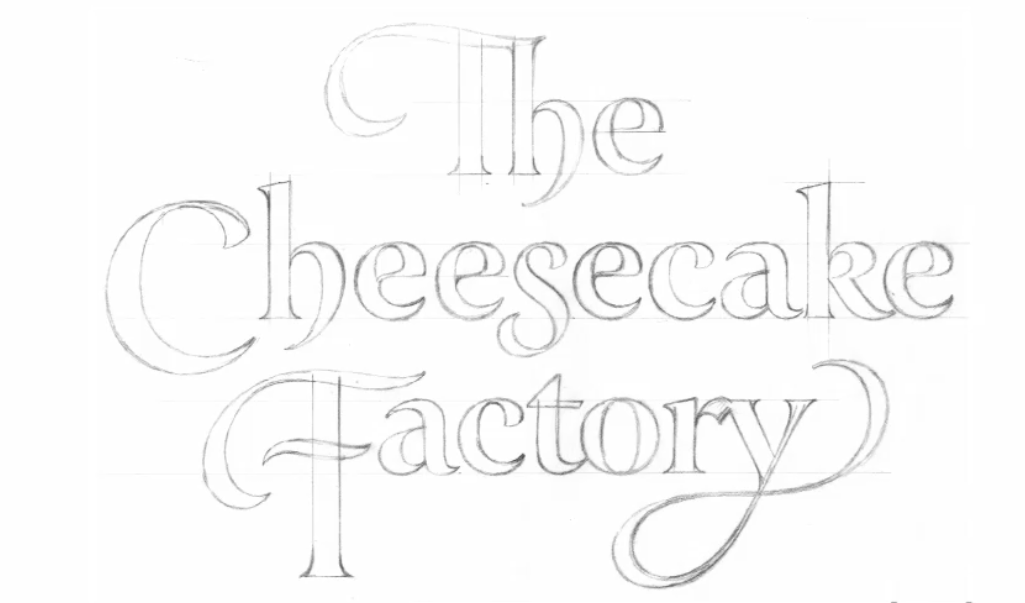
Today I want to post about the award-winning and prolific letterer Doyald Young. If you don’t know his name, I am certain you will recognize his work. Below are just two of the logotypes he has created. He teaches at the Art Center School of Design in Los Angeles and he has authored three books – more on his books in Part 2 and 3 of this post later this week.
I recently came across his work in an interview:Doyald Young on lynda.com and I immediately recognized it. Not just because of his logotypes for high profile clients like the Cheescake Factory and Prudential, but also for his lecturing across the circuit of graphic design professional organizations such as AIGA, the Art Directors Club and the Type Directors club. But in my opinion, his greatest work is the script lettering that he executes so seamlessly. Unlike calligraphers, he uses a pencil to draw the letterforms not a brush or crow quill pen. You can google his name for examples or stop by this blog next week when I will analyze some of his work and talk about his process.
TEASER: I just had to show this – just one example of my favorite work by Doyald Young.
If you don’t subscribe to lynda.com (a resource I couldn’t function without and well-worth the subscription rate. As a teacher of graphic design and visual communications, it helps me keep up with the latest technology.) Note: This plug is from the heart, I don’t get a commission for my recommendations. Here is a preview and an introduction to Doyald Young and his work on You Tube:
One of several sketches for the Cheesecake Factory logo by Doyald Young.
Another of several sketches for the Cheesecake Factory logo by Doyald Young.
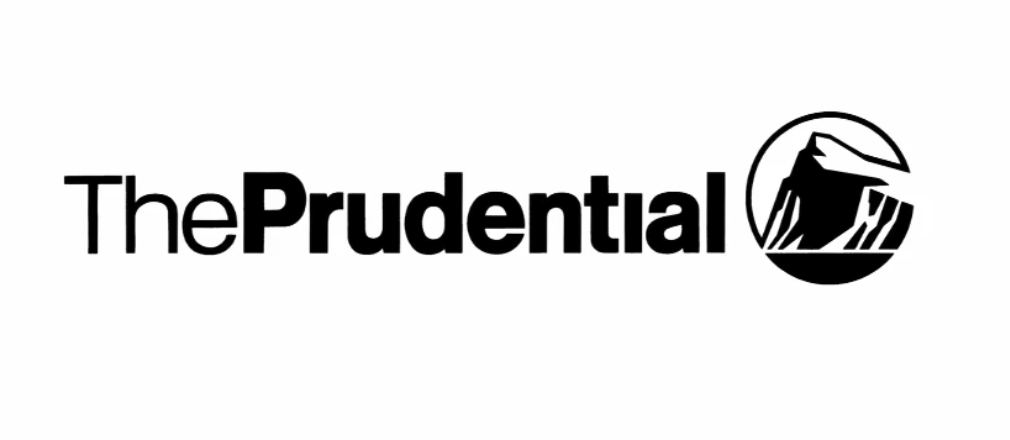
He was also asked to do a logo redesign for the insurance company Prudential – here is the original logo with the sans-serif face:
Prudential told him they wanted the logo to be “more friendly” he explained in an interview and for this reason he decided to use Century 725 as the typeface to base his design on. His reasoning was that Century Schoolbook, a typeface that was widely used throughout the 20th century and is still used to this day in text book design, was familiar to the public. Below are some of the sketches and an explanation of how he altered the typeface to suit the new Prudential identity :
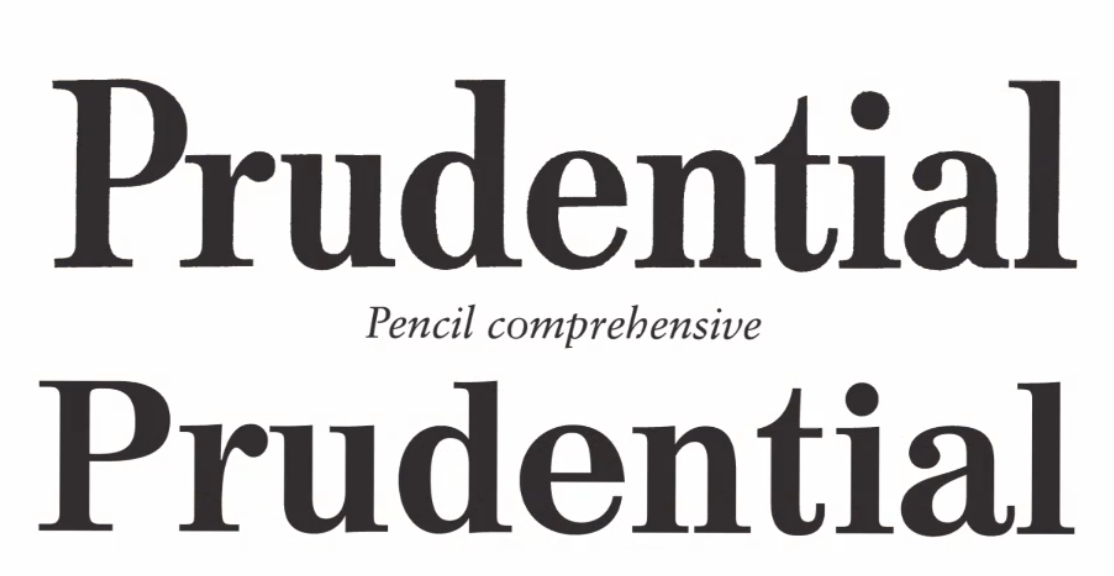
Here is his pencil comprehensive (top) and the original typeface (bottom).
On close examination, you can see he elongated the P and refined the curve to make it more pleasing and legible. He extended the height of the letters (they are now taller) and slightly extended the serifs and refined the curve of the serifs.
You can observe the difference in the “a” (original is on the left and Doyald’s is on the right).The best way to observe the change if you are new to visual design is to look at the shapes made by the negative space (empty space) and I think the change will be quite evident.
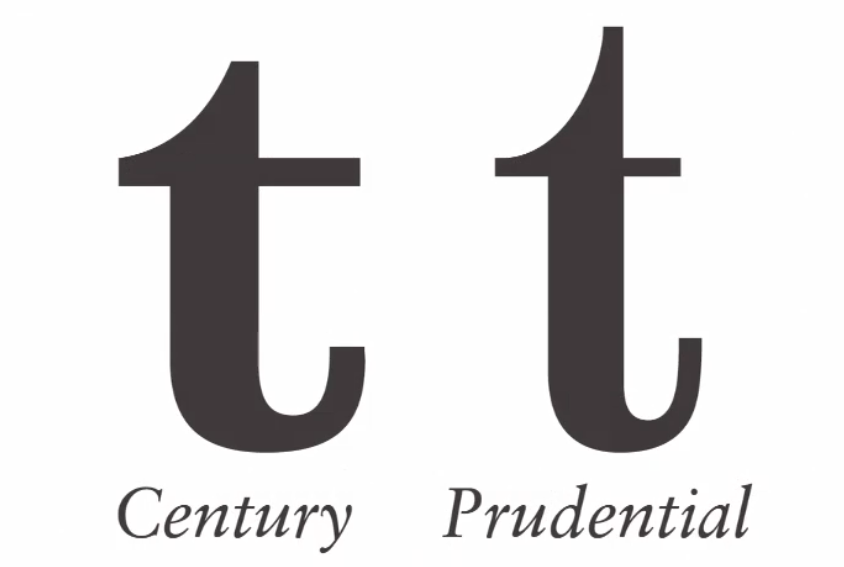
This “t” illustrates how the letters were extended and the curves were refined.
Here is the final logo that Prudential Insurance approved.
They were so pleased with his work that they commissioned him to design an entire font for them. Here is an example of the upper and lower case.
Please stop by next week for Part 2 of this blog post about Doyald Young an octogenarian whose work transcends time.
However, today I wanted to post about the issue of spec work and crowd sourcing for contracting graphic design work. Many times an individual that owns a small business will approach me and say “hey your a design teacher — would one of your students like to get some experience designing this or that project for free”? My answer is a resounding (but polite) NO! Then I explain that students have living expenses too and asking them to work for free is exploitation. Some people really don’t mean to be taking unfair advantage – they might not realize that design is work not just “fun creative stuff”.
I came across this article that I wanted to quote from, I think it is important to spread the word to young designers who are so anxious just to get a “real” assignment – that they might fall prey to this. Here is one example of how it works.
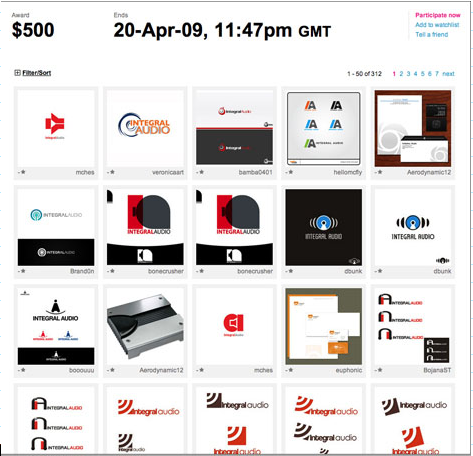
The CrowdSpring Web site shows a grid of designs entered for each project as well as fee, deadline, and a tally of submissions. Winning designs are revealed after the contest ends, indicated by a green triangle. Click below to see larger versions.
I received so many hits on my blog and positive comments from people who clicked on the last video; that I just had to share this second video. Milton answers the question "where am I going with design?" He makes all the frustration, toil and heartache seem worth it. — You must see this if — you Milton Glaser as I do.
Stay tuned I will be posting a recent lecture I attending via video conference where Milton discusses his current show In Search of the Miraculous or One Thing Leads to Another currently on exhibit at AIGA New York. I found some intriguing hidden images in his dark series – at least I think I did. I will post it soon.
A while ago I got a request from one of my students for some information on how to bill a client. They wanted to know how much to charge for a job, so I posted this article:
Occasionally I get a request about time sheets and invoices. I am attaching a timesheet, but I think it is easier to set one up in excel – tried to upload one but didn't have any luck. I always recommend that students start tracking their time on projects so they can become aware of exactly how much time a job will take. Then when someone asks for a quote they aren't dumbfounded – I know from my early personal experience how that feels – :0.
I am also attaching an estimate that is pretty detailed but can be customized or parred down to fit the need and a typical contract that I use; as well as a much simpler invoice that I got from one of my freelancers – the name has been changed of course.
I hope this is helpful for those who need this information.
I had my class watch a video clip in class today where Milton Glaser spoke about how great design makes ideas new. I was really pleased to see that the majority of students seemed genuinely interested in listening to what he had to say despite the generational divide. Here’s the clip see what you think.
As an instructor at the Art institute of California – San Diego, each new quarter brings with it the challenge of coming up with a fresh assignment for each class; which incorporates the core competencies of the class, while inspiring the students to be enthusiastic and see the value of how the project will advance their design skills and experience.
Design Team 1 and the Pushpin Project
This quarter one of the classes that I will be teaching is Design Team 1. I have had a lot of experience in team-based projects, indeed that is the main thesis of this blog; so I was excited to take this on, knowing full well the challenges working with students on teams. So I wanted to create a project that would first of all, give them an opportunity to showcase their creative talents within the parameters of real world job specifications and also demonstrate the benefits of collaborative synergy and how it can enhance the productivity of each member of a team.I think that the Pushpin Graphic is a shining example of how collaboration can benefit all who participate. Creating nothing short of a mastermind group.
My Introduction to the Pushpin Graphic
Back when I was a student I had the opportunity to study at the prestigious School of Visual Arts in New York. The great thing about attending the school is the opportunity to study with legendary graphic designers, typographers and illustrators. I took classes with notable artists such as Milton Glaser, Seymour Chwast, Paul Davis and got to meet James McMullan whose studio was and probably still is, located in the same building as Milton Glaser, Inc. These visionaries are just some of the group of artists who created and contributed to the Pushpin Graphic and later established Pushpin Studios. The publication lasted for eighty-six issues spanning the period of 1957-1980 and the work that came out of there has been a major influence in Graphic Design indeed creating a new design movement.
History of Pushpin Graphic
Pushpin Studios had a major effect on the visual design of the 1960s and 1970s. The two principal founding members, Seymour Chwast and Milton Glaser, achieved extremely high profiles in the graphic-design field, both through Push Pin and independently. But they began in the early 1950s as hungry design students out to make an impression and a buck. They were fabulously successful.
Why I chose this Project – Pushpin Graphic Remix
I feel the this project will give my students a chance to showcase their talents and will serve as a promotional piece. The challenge is to showcase your talent while collaborating with a team to interpret a theme that allows for a lot of creative innovation. I hope it will teach these young creatives the power of collaboration and innovation. I will be posting more about the Pushpin Graphic and more on the project and the experience my students have while doing it.







 Synergy Creative